
Acquisition
Set up GA4 and BigQuery attribution
Connect Shopify App Store GA4 tracking to BigQuery and map the export dataset in Fusionmetrics.
Last updated
Fusionmetrics joins Shopify App Store acquisition activity from Google Analytics 4 with app revenue data. The reliable path is Shopify App Store tracking to GA4, GA4 daily export to BigQuery, then an app-level dataset mapping in Fusionmetrics.
Create the GA4 property and web data stream
Create a dedicated GA4 property for the app or choose an existing property whose governance and event scope are appropriate. Add a web data stream and copy its Measurement ID, which starts with G-.
In GA4, create a Measurement Protocol API secret for that stream. Treat the secret as a credential: enter it directly in Shopify and never place it in documentation screenshots or source control.
Configure Shopify App Store tracking
Open the app's distribution or listing settings in the Shopify Partner Dashboard and enter the GA4 Measurement ID and Measurement Protocol API secret.
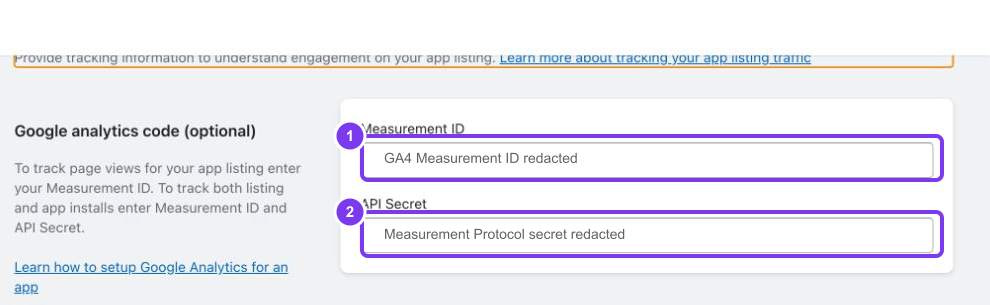
Shopify sends listing activity to the configured GA4 property. Follow the current Shopify App Store GA4 tracking guide because the Partner Dashboard labels can change.
Merchant identity on install events
Fusionmetrics recognizes the install event name shopify_app_install. Send the permanent Merchant shop identity when you control an accompanying event or enrichment flow.
shop_url is the recommended parameter:
{
  "name": "shopify_app_install",
  "params": {
    "shop_url": "merchant-shop.myshopify.com"
  }
}
Accepted Merchant identity parameters are shop_url, shopify_domain, myshopify_domain, shop_domain, and shop. Optional shop_id and app_id values can add context, but they do not replace the permanent shop domain.
The absence of a recent shopify_app_install event produces a validation warning rather than blocking all acquisition imports. Confirm the event before relying on install conversion reporting.
Link GA4 to BigQuery
In GA4, open Admin, then Product links → BigQuery links, and create a link to the Google Cloud project that should contain the export.
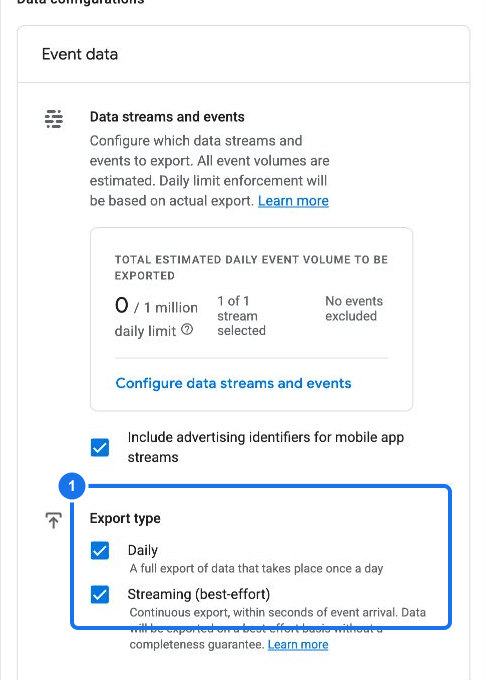
Choose the appropriate data location and enable the daily event export. Streaming export is optional. Google creates a dataset named:
analytics_<property_id>
Daily tables use the pattern:
analytics_<property_id>.events_YYYYMMDD
Fusionmetrics dataset mappings therefore use the fully qualified form project.analytics_<property_id>, without an events_* table suffix. See Google's GA4 BigQuery export guide for export availability, limits, and timing.
Grant BigQuery access
Fusionmetrics prefers the BigQuery Storage Read API. For a service account that you manage, use the least broad scope that supports streamed reads:
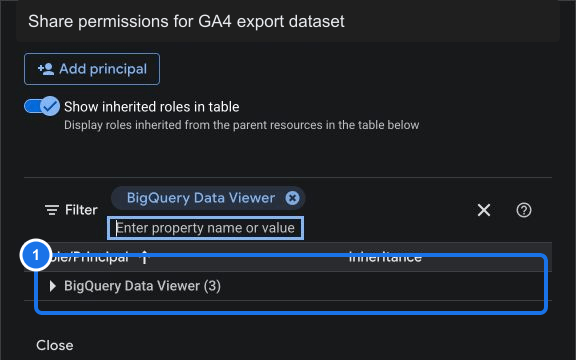
- Grant BigQuery Data Viewer on the
analytics_<property_id>dataset. - Grant BigQuery Read Session User on the Google Cloud project named in the service-account JSON.
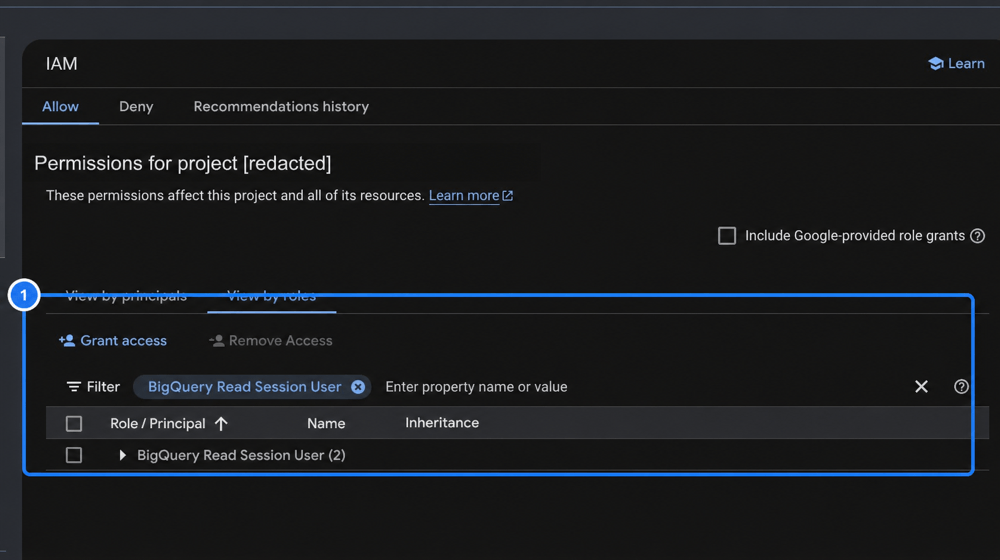
BigQuery Job User is optional for new connections. Grant it on the service-account project when you want Fusionmetrics to retain its SQL compatibility fallback. Existing connections without Read Session User continue through that fallback when Job User is already available, and switch automatically to Storage Read after the preferred role is granted.
Refer to the BigQuery IAM role documentation when your organization uses custom roles or IAM Conditions.
Hosted Fusionmetrics
In Attribution connection, copy the Fusionmetrics-managed principal. Grant that principal BigQuery Data Viewer on the GA4 export dataset. Fusionmetrics manages Read Session User in its own Google Cloud project, so you do not need to grant a project-level query or read-session role.
You do not need to download or upload a service-account key for the managed connection.
Self-hosted Fusionmetrics
Create a dedicated Google Cloud service account and JSON key. Grant its email BigQuery Read Session User on the service-account project and BigQuery Data Viewer on each GA4 export dataset. Optionally grant BigQuery Job User on the service-account project to keep SQL fallback available. Paste the complete service-account JSON into the self-hosted Attribution connection settings, then validate it.
Keep the JSON credential under the Fusionmetrics runtime data controls. Do not commit it to the repository or include it in screenshots.
Map the dataset in Fusionmetrics
Open Attribution connection, confirm the credential is validated, then open the app settings and enter project.analytics_<property_id> as its GA4 dataset.
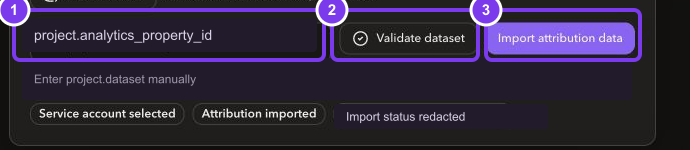
Validation checks the credential, dataset, expected events_* tables, recent event data, required event shape, and preferred read mode. A successful result reports either Storage Read API ready or Connected using SQL fallback. After validation succeeds, start the first acquisition import. The initial import can take longer than later incremental imports because it scans the configured historical window.
Routine refreshes import each new daily events_YYYYMMDD table once, beginning with the day after the stored watermark. Fusionmetrics excludes events_intraday_*. When no newer daily table exists, it preserves the watermark and existing GA4 facts while recalculating attribution against the latest revenue data. Existing credentials remain operational through SQL fallback and switch automatically to Storage Read after their IAM roles are updated.
Validate the data flow
Use this sequence to isolate setup issues:
- Confirm GA4 DebugView or Realtime receives listing activity.
- Confirm the BigQuery dataset exists in the expected project.
- Confirm at least one
events_YYYYMMDDtable exists. - Query recent rows for
page_viewandshopify_app_install. - Validate the connection and dataset in Fusionmetrics.
- Run the first import and review the reported table suffix.
Export tables can arrive after GA4 reports show activity. A short delay is normal; repeated missing daily tables needs investigation.
Troubleshoot GA4 and BigQuery
Dataset or tables are missing
Check that the BigQuery link targets the intended Google Cloud project, daily export is enabled, and the GA4 property has collected data since the link was created. GA4 does not necessarily backfill activity from before the link.
Fusionmetrics reports the wrong project
Use the project that owns the analytics_<property_id> dataset, not automatically the project where another app service runs. Enter the mapping as project.dataset.
Events are delayed or excluded
Compare the newest events_YYYYMMDD table with the GA4 reporting date. Review consent settings, internal/developer traffic filters, data retention, and any event exclusions. Confirm page_view exists; then verify shopify_app_install and its Merchant identity parameter separately.
SQL fallback cannot create query jobs
SQL fallback requires BigQuery Job User plus an active billing arrangement or sufficient sandbox capacity. Grant BigQuery Read Session User to use the preferred Storage Read path, or review the Google Cloud billing account, quotas, and project restrictions affecting fallback queries.
IAM validation fails
Confirm BigQuery Read Session User is granted on the service-account project and BigQuery Data Viewer covers the actual GA4 dataset. If the connection must use SQL fallback, also confirm BigQuery Job User on the service-account project. Check for IAM Conditions, organization policies, disabled service-account keys, or a managed principal copied from the wrong Fusionmetrics environment.